FOCUSEQ · NEXT-GEN WORKFLOW EQ · GET IT FREE

NEXT GEN WORKFLOW EQ

ONE EQ.
NEXT GEN WORKFLOW.

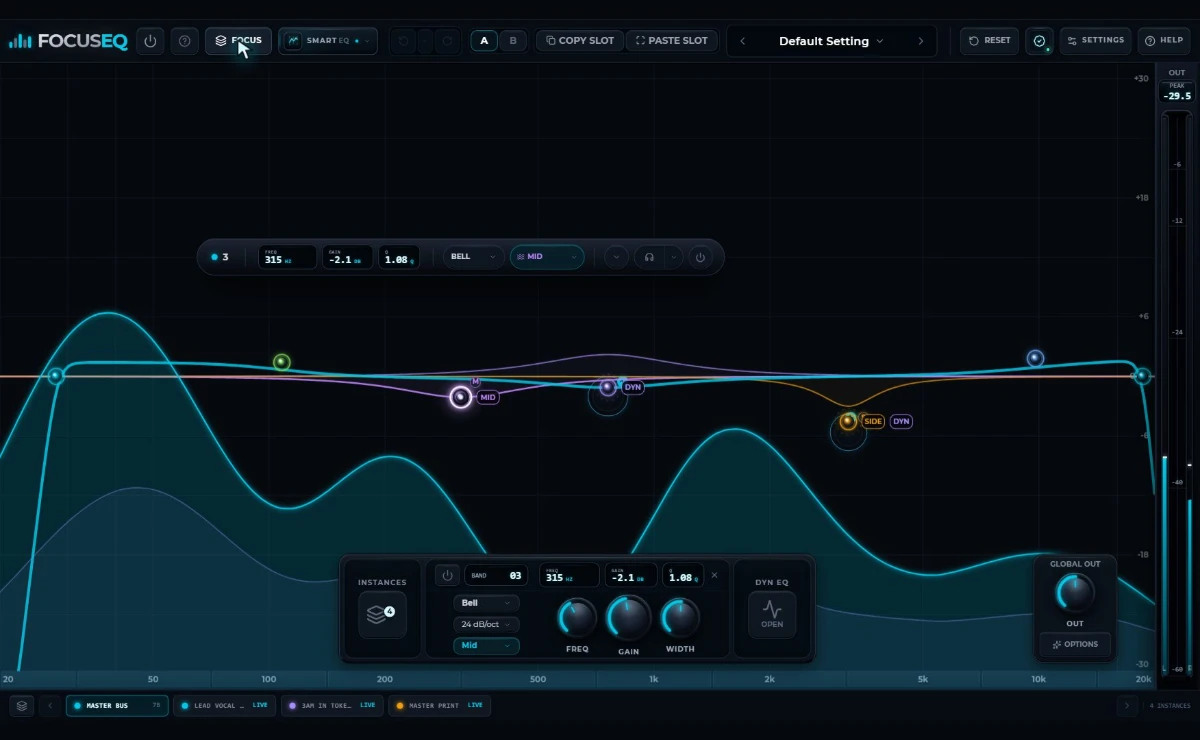
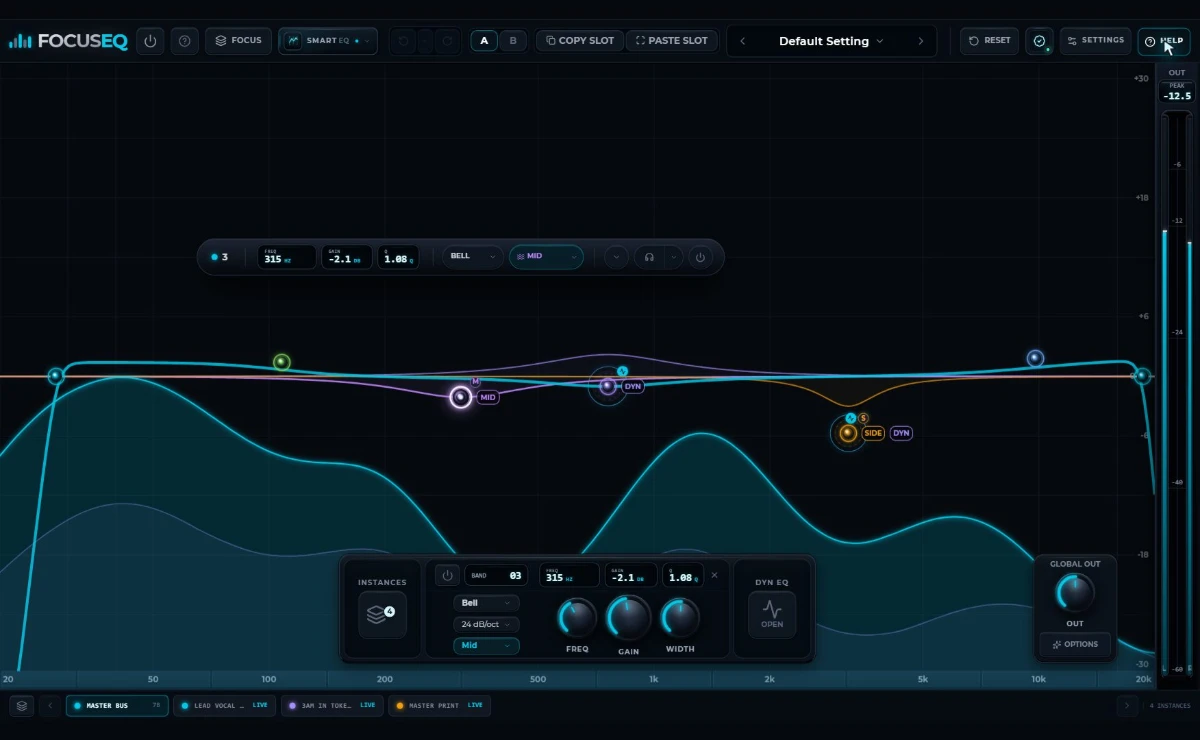
Open a connected FocusEQ instance from one window. Shape 12 bands, audition decisions through Focus Monitor, build an editable Smart EQ curve, or route a same-process FocusEQ peer into another band’s Dynamic EQ.

REAL FOCUSEQ INTERFACEFOCUS INSTANCES / LIVE WORKFLOW
CONNECTED MIXINGONE WINDOW.
EVERY INSTANCE.
DYNAMIC EQCONTROL IN MOTION
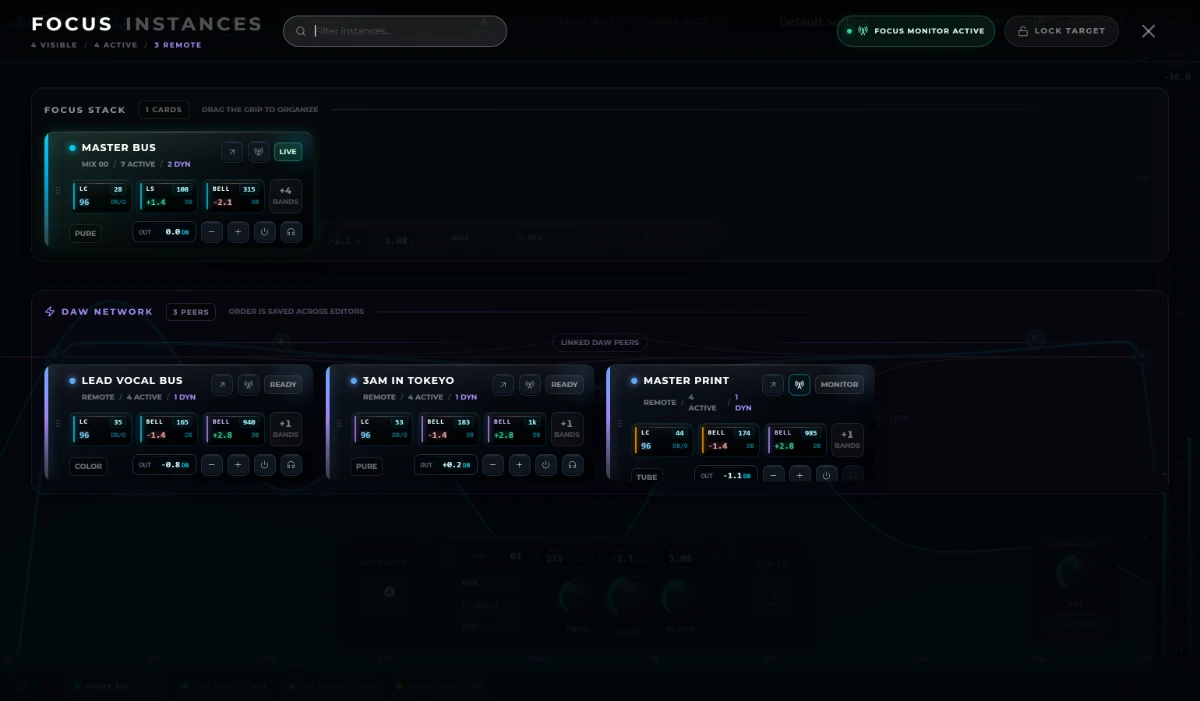
01 Focus Instances Connected EQs in one view
02 Smart EQ 12 measured, editable profiles
03 Dynamic + Sidechain Peer sidechain within one DAW process
04 20 Hz–20 kHz 12 independent shaping bands

Try the FocusEQ workflow

Don’t just watch it.
Shape the workflow.

This browser demo mirrors the shipped FocusEQ controls. Analyzer motion and DAW input are simulated; no audio is processed.

  • 01Move a band
  • 02Open Smart EQ
  • 03Explore Instances
  • 04Try Dynamic EQ
REAL FOCUSEQ INTERFACE
Real interface loads when you explore

The FocusEQ system

Seven feature chapters.One uninterrupted mix.

Start with Focus Instances: select a connected EQ, see its analyzer, edit it, or audition it without reopening plug-in windows. Then move through Smart EQ, Dynamic EQ, precision shaping, recall, workspace organization, and the built-in guide.

Focus Instances

Every EQ in the mix.One focused window.

Select · Monitor · Organize

Cards follow available DAW track names and keep their saved order. Select a card to view its analyzer, edit its EQ, lock the target, or audition it through Focus Monitor—without reopening plug-in windows.

  • DAW-named, reorderable instance cards
  • Open a connected instance’s analyzer and edit its EQ
  • Focus Monitor and solo in context
Smart EQ

Choose a goal.Hear a measured starting point.

12 profiles · Producer · Engineer · Artist

Choose a role and target, let Smart EQ listen, then replace the current curve or add the result. Every applied FocusEQ band remains fully editable.

  • 12 purpose-built profiles
  • Replace or add to the current curve
  • Every resulting band stays editable
Dynamic EQ

Let one FocusEQ listen.Make another respond.

Manual · Smart · Same-process peer

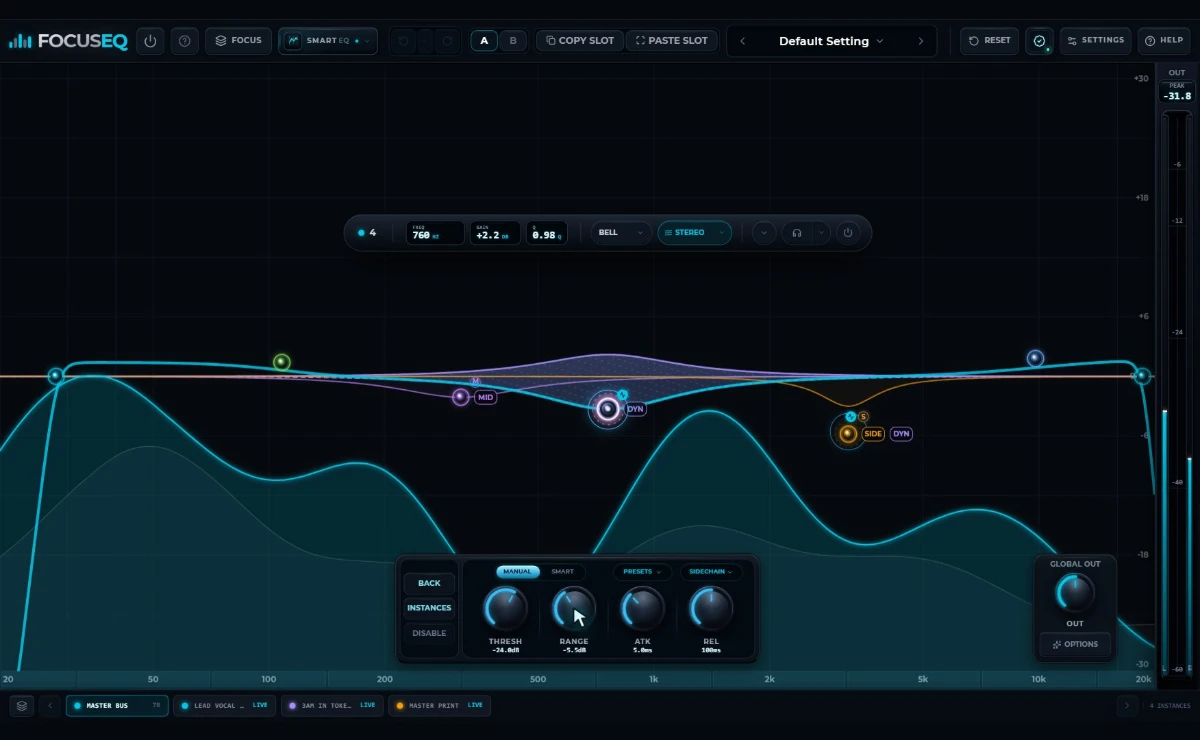
Set eligible Peak and Shelf bands to Manual or Smart detection, then use the current signal or a compatible FocusEQ peer in the same DAW process as the detector source.

  • Manual and Smart detection
  • Same-process FocusEQ peer sidechain
  • Threshold, Range, Attack, and Release

ENGINEERING / SIGNAL PATH

The interface can glow.
The DSP stays disciplined.

Every curve, detector, and routing choice is backed by a real-time C++ signal path—not a visual simulation.

  1. 20
  2. 50
  3. 100
  4. 200
  5. 500
  6. 1k
  7. 2k
  8. 5k
  9. 10k
  10. 20k

Signal path

01

Input + pre-EQ capture

Two synchronized analyzer views keep the live spectrum and post-EQ context aligned.

02

2× FIR oversampling

Fixed 2× linear-phase halfband FIR oversampling with host-reported latency.

03

12-band filter core

Twelve independent minimum-phase IIR bands use double-precision filter arithmetic across five routing domains.

04

Dynamic detector

Frequency-selective control from the current signal or a FocusEQ peer in the same DAW process.

05

Pure / Color / Tube

Pure stays transparent, Color adds restrained harmonic polish, and Tube adds stronger asymmetric density.

06

Aligned output

Smoothed bypass and output transitions with peak and RMS metering.

Core specification

20 Hz–20 kHz

operating range

12

independent shaping bands

64-bit

filter arithmetic

8192

maximum FFT size

128

log-spaced display bins

5 routes

Stereo · Left · Right · Mid · Side

AUDIO THREAD

Built for steady-state work.

Preallocated processing, active-band work lists, non-blocking peer access, and smoothed parameter, bypass, and character transitions.

ANALYZER ENGINE

Detail when you need it.

Selectable 2048, 4096, or 8192-point Blackman–Harris FFT analysis, synchronized pre/post views, and visual capture that wakes only when the interface needs it.

CPU use varies with sample rate, buffer size, active bands, Dynamic EQ, and analyzer settings.

Precision shaping

See before.Hear after.

20 Hz–20 kHz · 2048 / 4096 / 8192 FFT

Read synchronized pre-EQ and post-EQ views in Smooth or Precise response, then shape the full spectrum without leaving the graph.

  • 12 independent shaping bands
  • Low Cut, Shelf, Peak, High Shelf, and High Cut
  • Stereo, Left, Right, Mid, Side, and isolate
Preset workflow

158 starting points.Still your curve.

Seven categories · Tags · Favorites · Recents

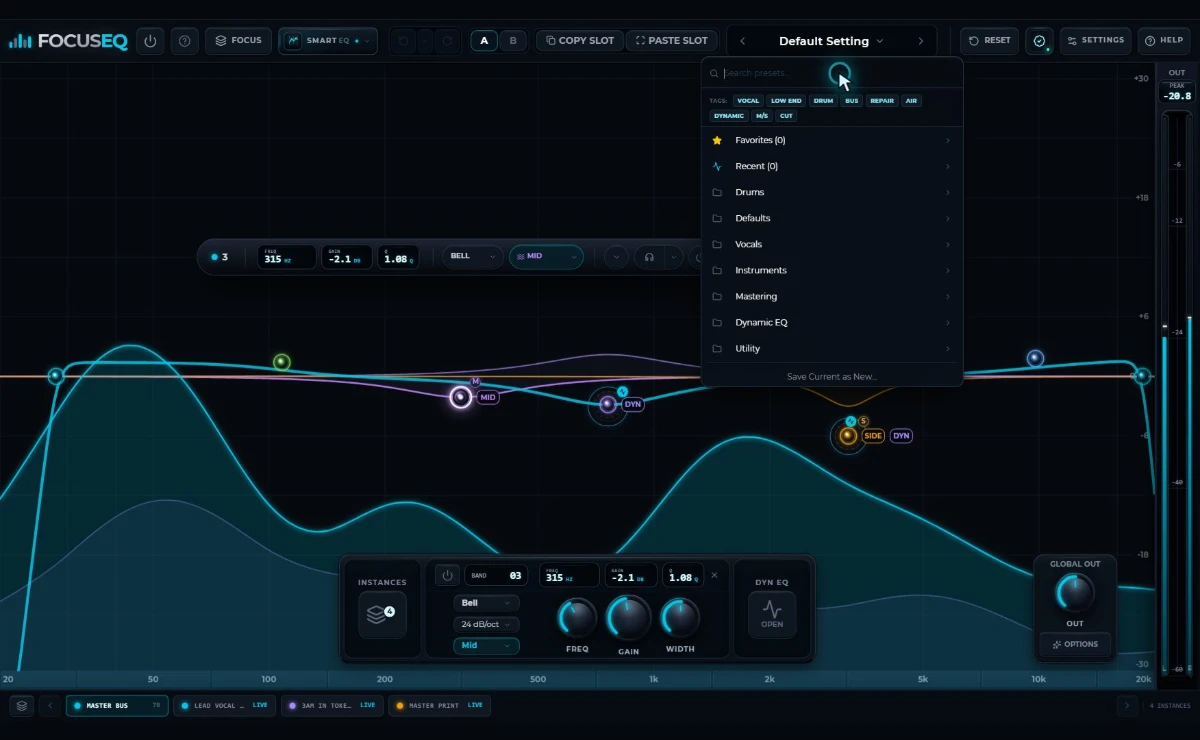
Search 158 factory presets across seven categories, filter by intent, recall Favorites or Recents, and save your own settings without leaving the workspace.

  • Search and intent tags
  • Favorites and recent presets
  • Save current settings as a preset
Workspace

Save the Focus Stack.Not just the curve.

Named workflow sets · Separate from presets

Save the instance organization that fits a session and return to it without mixing workflow state into processing presets.

FocusEQ Guide

Answers inside the session.Without leaving the mix.

Searchable · Current · Built in

Search current feature chapters, engine controls, and keyboard shortcuts without leaving FocusEQ or breaking the session flow.

Bring connected decisionsinto one focused flow.

Focus Instances, 12 Smart EQ profiles, responsive Dynamic EQ, 12-band precision shaping, 158 presets, and Pure, Color, or Tube output character—built as one coherent workflow.

FocusEQ

Next Gen Workflow EQ

Your next-gen workflow starts here

FREE

Email registration. No payment required.

  • Focus Instances connected workflow
  • 12-band precision and Dynamic EQ
  • Smart EQ with editable results
  • Pure, Color, and Tube output character
Get FocusEQ FreeWindows + macOS registrationFREE
Email-only registrationWindows + macOS

Windows and macOS installers are being prepared. Register to hear when the download links are ready.

SYSTEM + HOST

Built for the studio
you already use.

FocusEQ is available for Windows and macOS, with VST3 and Audio Unit formats for compatible 64-bit DAWs.

AVAILABLE

Windows

Windows 11

x64 / 64-bit

VST3

AVAILABLE

macOS

Apple silicon + Intel

64-bit

AU + VST3

VST3

Windows + macOS

Audio Unit

macOS

Internet

Email registration + download

QUESTIONS, ANSWERED

Everything before
the first insert.

Compatibility, workflow, downloads, and the features that make FocusEQ different.

What is FocusEQ?

FocusEQ is a 12-band workflow equalizer built for precision shaping, Dynamic EQ, Smart EQ, and connected multi-instance mixing across a 20 Hz–20 kHz workspace.

What makes Focus Instances different?

Focus Instances uses DAW-named, reorderable cards to select a compatible FocusEQ instance, view its analyzer, edit its EQ, lock the target, or audition it without reopening plug-in windows.

What is Focus Monitor?

Focus Monitor auditions a selected FocusEQ peer through the current editor so you can hear and shape another track in context. Participating instances must share the same DAW audio process.

How does Smart EQ work?

Choose one of 12 profiles across Producer, Engineer, and Artist roles, let FocusEQ listen, then replace the current curve or add a measured starting point. Every resulting FocusEQ band remains editable.

What can Dynamic EQ respond to?

Eligible Peak and Shelf bands can react with threshold, range, attack, and release controls in Manual or Smart mode. Detection can follow the current signal or a compatible FocusEQ peer in the same DAW process.

What do Pure, Color, and Tube do?

Pure keeps the output transparent. Color adds restrained harmonic polish. Tube adds stronger asymmetric density when the mix needs more character.

What does the analyzer show?

FocusEQ displays synchronized pre-EQ and post-EQ spectrum views from 20 Hz to 20 kHz, with Smooth or Precise response and selectable 2048, 4096, or 8192-point FFT resolution.

Can I save and recall my work?

Yes. Your DAW project stores FocusEQ state. Presets, A/B comparison, Copy/Paste slots, and session workflow tools make it easy to recall or move settings.

Which systems and formats are supported?

FocusEQ supports 64-bit VST3 on Windows and macOS, plus Audio Unit on macOS.

Will every Focus feature work in every DAW mode?

Standard per-instance EQ works in compatible hosts. Real-time Focus Monitor, cross-instance Solo, and peer-sidechain audio require participating instances to share an audio process; some DAW bridge or sandbox modes can limit those specific audio features.

Is FocusEQ free?

Yes. Register with your email for the free Windows and macOS release. No payment or card details required.

Where are the download links?

The Windows and macOS installers are being prepared. Register your email and we’ll share download availability updates.

How is my email used?

Your email registration is saved in WordPress and used for download availability and related FocusEQ release updates. See our Privacy Policy for details.

Which DAWs can use FocusEQ?

FocusEQ works in compatible 64-bit DAWs that support VST3 on Windows or macOS, and Audio Unit on macOS.